Keyword selection can make or break your SEO results. Target the wrong terms and you will waste months creating content that never ranks. Target the right ones and you build a pipeline of organic traffic that compounds over time.
The challenge is knowing which keywords deserve your effort. Raw search volume only tells part of the story. You also need to weigh difficulty, business fit, and whether Google will even send clicks for that query. I have refined this into a 7-step process that covers every angle, from finding your first seed keywords to mapping them across your site.
Here is exactly how to choose keywords for SEO, step by step.
1. Build a seed keyword list
Before you can evaluate anything, you need raw material. A seed keyword list is your starting pool of topic ideas that you will filter, score, and prioritize in the steps that follow.
There are several ways to generate seed keywords, and the best approach combines multiple sources.
Brainstorm from your expertise
Start with what you already know. Write down every term your customers use when they describe their problems, your product category, or the outcomes they want. If you run an SEO tool, seeds might include "keyword research," "content optimization," "on-page SEO," or "rank tracking."
Mine Google Search Console
Your queries report in Google Search Console shows exactly which search terms already bring impressions to your site. Sort by impressions to find high-potential terms you are not yet ranking well for. These are keywords Google already associates with your domain.
Use Google autocomplete and People Also Ask
Type your core topic into Google and note the autocomplete suggestions. Scroll through the search results and expand every "People Also Ask" box. These represent real queries people are searching for, phrased in their own language.
Expand with Keyword Surfer
You can speed up this process using a free keyword research tool like Keyword Surfer that surfaces hundreds of related keywords directly on the SERP.
- Download and install Surfer's Chrome extension
- Enter your main keyword into Google
You will see additional data on your search engine results page, including monthly search volume and traffic insights for each result.

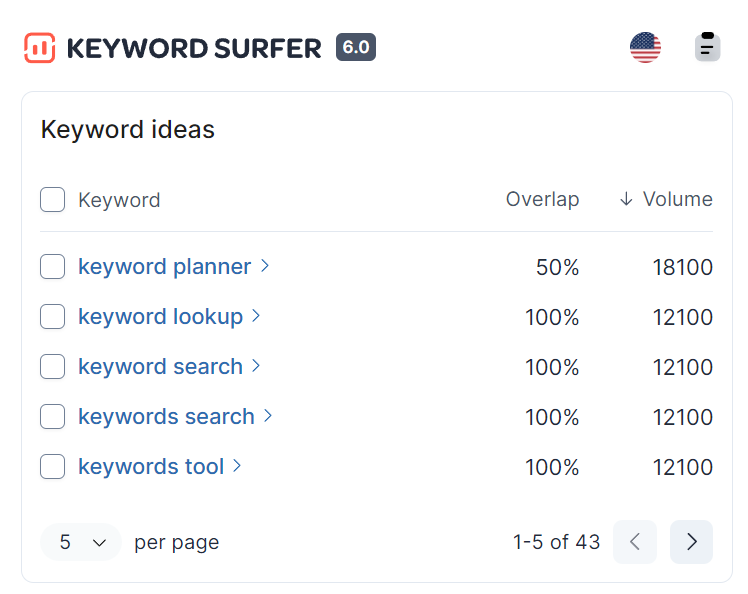
Look at the right panel on your SERP. You will find a ton of related SEO keyword ideas that expand on your seed keyword along with monthly search volume and relevance to your primary keyword.
You can save or export this list of topically related keywords.
For example, my search for "keyword research" led to discovering "keyword research tools." I then entered the same keyword in the Google search bar and found even more keywords using Surfer.
Repeat this process a few times, and you will generate a sizeable list in under an hour.
2. Assess the business value of each keyword
The business value of a keyword is its relevance to your products or services. There is no point publishing posts on topics unrelated to your business, even if they seem like easy keywords to rank for. What use would it be to rank number one for "email software" if you sell a chatbot?
The higher the business value, the more likely a keyword is to attract the audience you want, increasing their chances of converting to customers.
Ask yourself whether your customers would be interested in a keyword to help identify its business potential. For example, would Surfer's audience be interested in "keyword research tools?"
Yes, of course, since SEO content and keyword optimization are Surfer's main offerings. Let's try something less obvious. In step 1, I found "link building strategies" as a possible keyword we could choose for our blog.

On the face of it, this does not seem like an obvious fit for Surfer's audience. Surfer does not offer email outreach or email finder products, so this would be an easily dismissable keyword.
Let's dive deeper. What sort of topics are folks reading about link building strategies interested in? It would be fair to say that they are trying to pitch either their blog posts or guest posts for links.
This tells us that they will need to write well-optimized posts based on a solid keyword research strategy. And why are they looking for links? To rank higher.
People looking for link building strategies will also be interested in using keyword tools for their articles. That is precisely what Surfer helps with: ranking higher using SEO tools for keyword research and content optimization.
It made perfect business sense for us to write an article on this topic even though it was not immediately apparent. So now you know why we published an article on "link building strategies."
Single out the best keywords for your target audience that are a natural fit for your business. This will be unique to your situation and is not something a search engine optimization tool can determine for you.
Not all keywords are equal regarding business value for your website. In our case, "keyword research tools" has higher business potential because it is directly aligned with the tools we offer and can serve as a showcase for them. On the other hand, articles about link building have lower business potential and are therefore lower in priority.
3. Check keyword difficulty
Finding a keyword with business potential is great, but can you realistically rank for it? Assessing keyword difficulty helps determine whether a keyword is worth pursuing right now or should wait until your site has more authority.
Judging how difficult a keyword is to rank for manually requires analyzing top-ranking pages and their authority for the search term in question. A quick manual check involves looking at who currently ranks: are they massive authority sites, or are there smaller players in the top 10? If you see sites with similar authority to yours ranking well, that is a positive signal.
Surfer provides keyword difficulty scores as a measurable metric in the Keyword Research tool. You can use this rating to judge the ranking difficulty of keywords for your website.
Unlike other keyword tools that show a generic keyword difficulty score, Surfer Keyword Research displays keyword difficulty as a relative metric based on your website's authority for that keyword.
To find keyword difficulty for your search terms, head to Surfer Keyword Research and follow these steps.
- Enter your target keyword and country
- Click Create Keyword Research
The Keyword Research tool will take a few seconds before generating tons of keyword clusters grouped by head keywords related to your main topic. Use the search bar on the right side to narrow the list to the most appropriate keyword phrase. For example, I am interested in the relative keyword difficulty for "keyword research tools."

The Keyword Research tool shows me the most relevant keywords for this search based on already ranking data from the SERPs. In my case this would be "tools for keyword research".
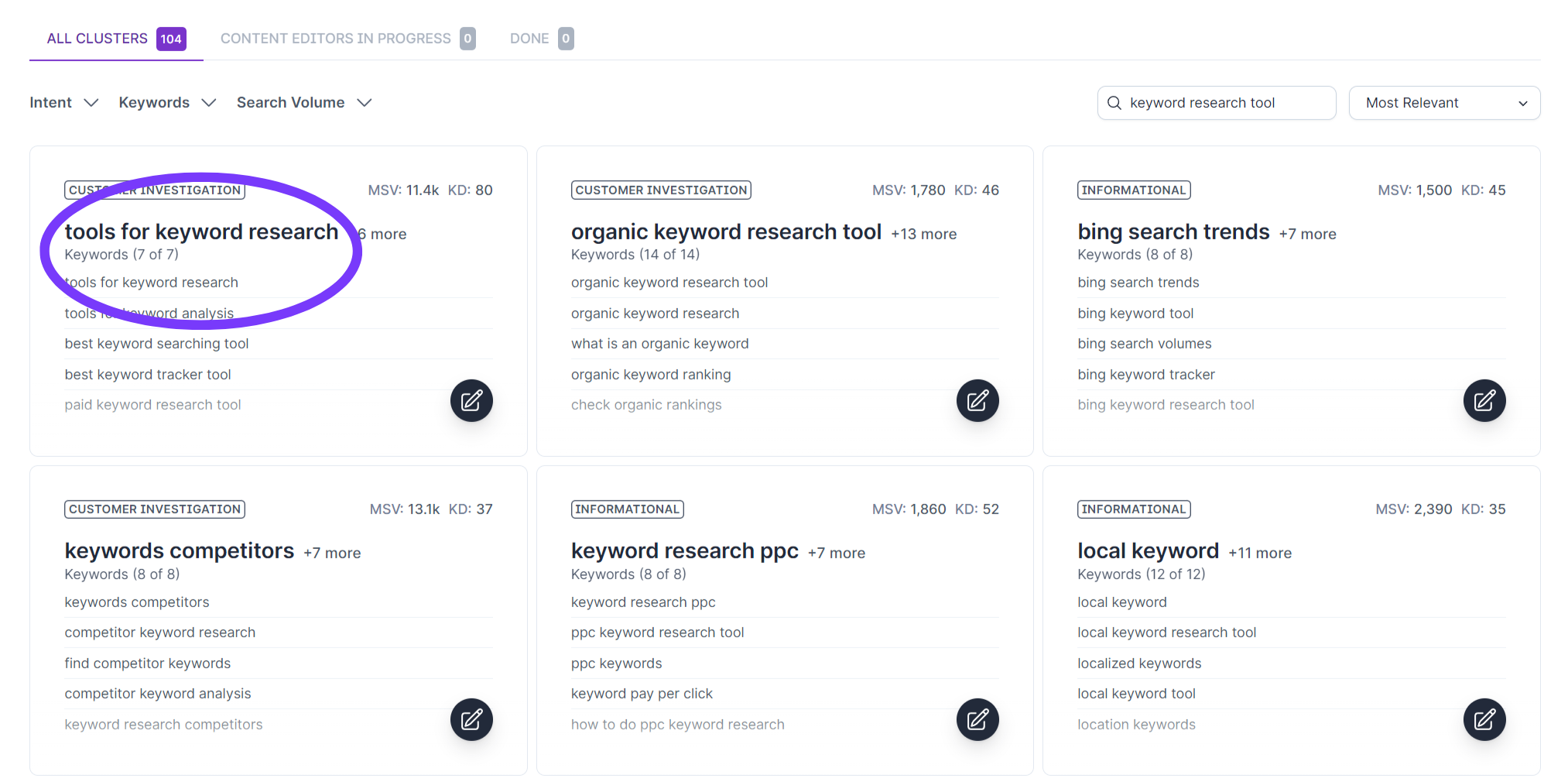
Clicking on a relevant card will display the relative keyword difficulty (RKD) for that keyword on a scale of 1-100. You will also receive a list of keywords to include in the same article or ideas for new ones.
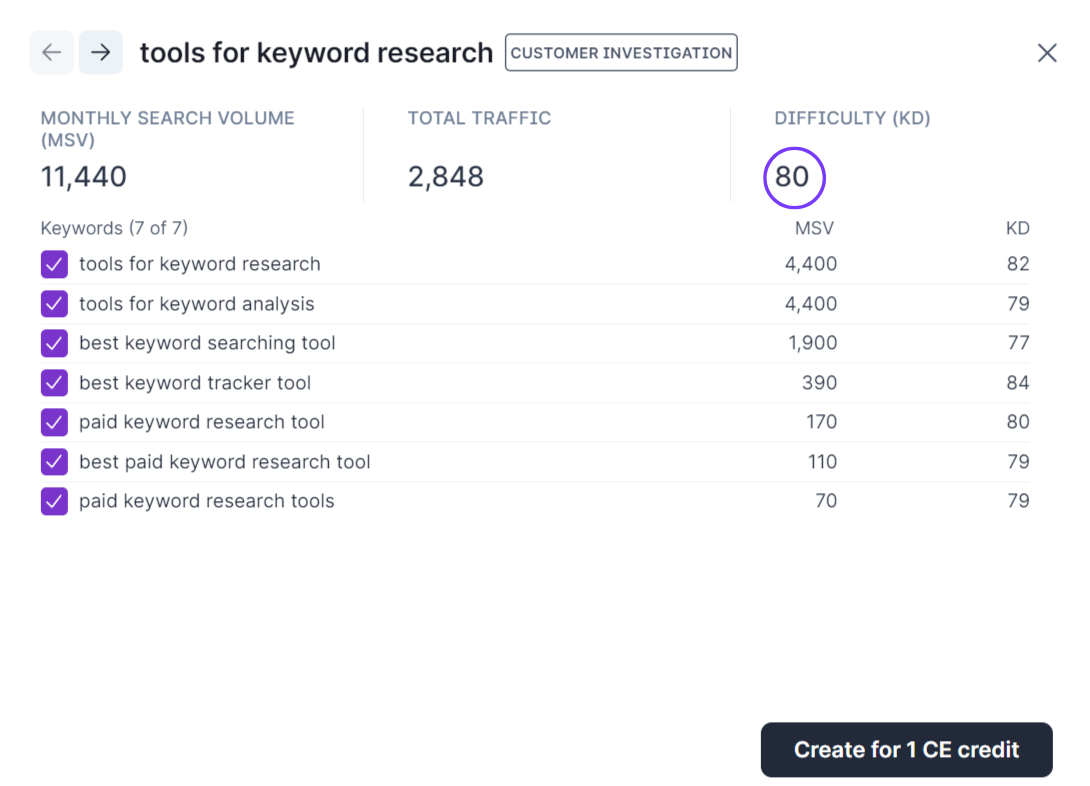
Since the RKD is based on your website's prospects of ranking for that keyword, it makes sense to go after low-difficulty long-tail keywords first before tackling more challenging target keywords.
Treat keyword difficulty as a guideline, not the final say, to help you choose the right keywords for your blog. You will not rank for every keyword you publish articles for. But low-difficulty keywords and SERP rankings should not be your only goal.
You should target semantically related keyword phrases to create topic clusters that demonstrate your website authority in the eyes of search engines, even if you don't rank for these keywords.
Surfer's Ranking Factors Study, which analyzed 1 million SERP results, found that topical coverage is the strongest on-page signal tied to rankings. This means choosing keywords you can build depth around matters as much as raw difficulty scores.
4. Evaluate search volume and traffic potential
One of the foundational pillars of keyword research lies in identifying keywords with significant search volume. You do not want to choose keywords without potential visitors.
Unfortunately, the free tool Google Keyword Planner provides broad volume ranges that can be difficult to interpret without an active ad spend. Surfer's tools provide more precise data along with additional keyword suggestions.

There are two ways Surfer can help you identify a keyword's search volume.
Find the monthly search volume of a single keyword
Use Keyword Surfer's Chrome extension to enter your keyword into Google, and the search bar will show the monthly search volume in your selected country. The right panel will display related keywords with their search volumes.

This is a good starting point for conducting keyword research, but pages now rank for multiple keywords, or keyword clusters.
A quick look at your queries report in Google Search Console will show you all the search terms your pages rank for.
Find the monthly search volume of a keyword cluster
The Keyword Research tool that we used to check keyword difficulty in step 3 also displays search volumes by keyword cluster and individual keyword phrases.
Use this data to help you in choosing the right keywords for SEO.
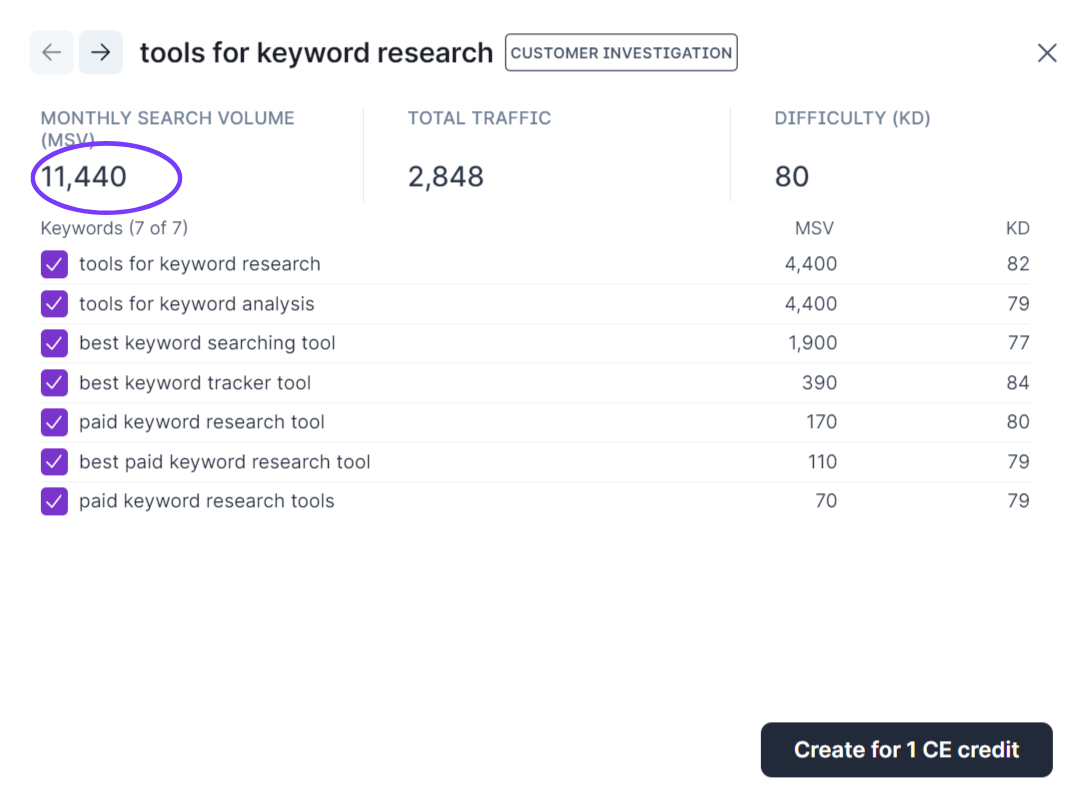
The search volume breakdown by keyword is valuable because your pages rank for multiple keywords in search results, so identifying search volume for a single keyword can be misleading.
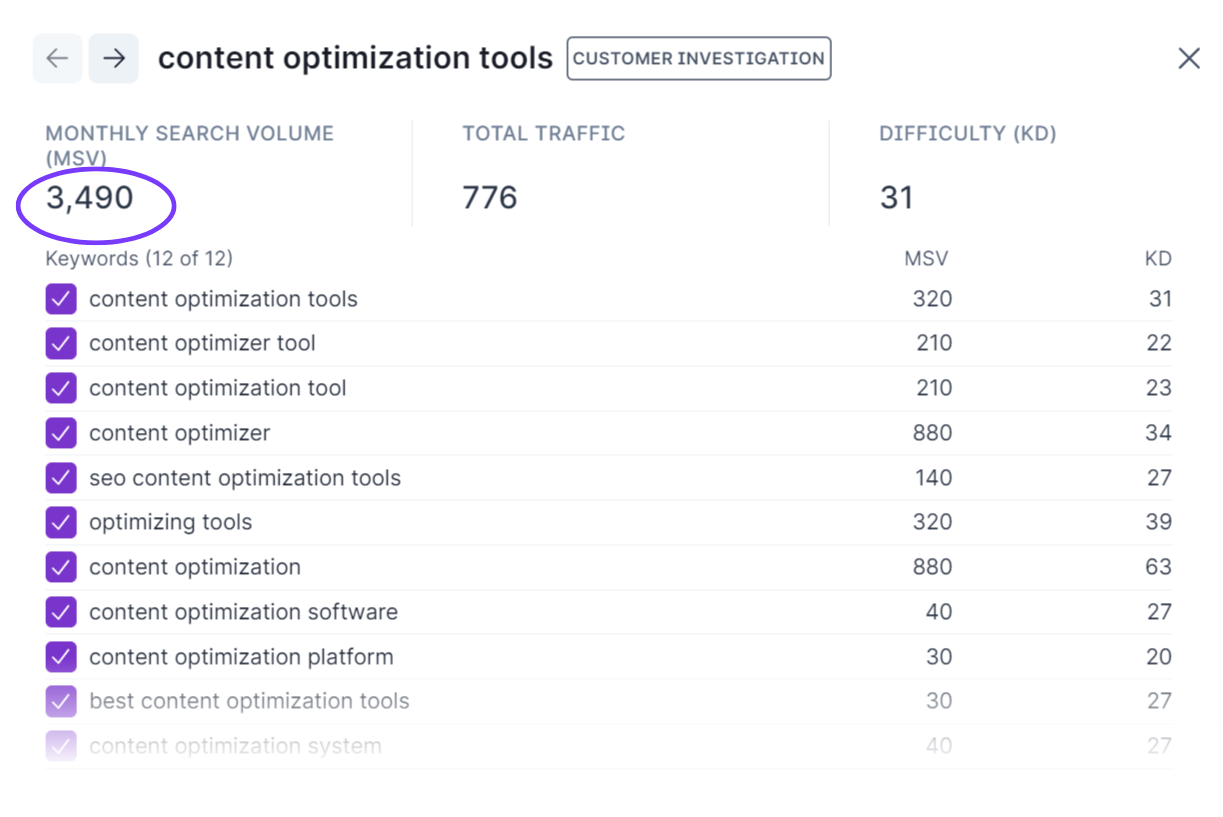
For example, the keyword "content optimization tools" has a relatively low search volume of 320 per month.

But using Surfer Keyword Research, I can see that the keyword cluster has a monthly search volume of 3,490. Based on this, I would likely prioritize a blog post on this topic which I may have otherwise postponed.
Long-tail keywords tend to have much lower volume than broad informational keywords at the top of the buyer's awareness journey but are more likely to convert because of higher purchase intent, so do not brush these aside.
Why traffic potential matters more than volume
Keywords with the highest search volumes do not always translate to the most traffic for your web pages. Google search results now include AI Overviews, featured snippets, knowledge panels, and other features that answer queries directly on the SERP.
According to Surfer's AI Overviews Study, which analyzed over 405,000 searches, AI Overviews appear in 47% of all searches and informational queries trigger them in over 70% of cases. These zero-click results mean that a keyword's search volume alone can overstate how much traffic you will actually receive.
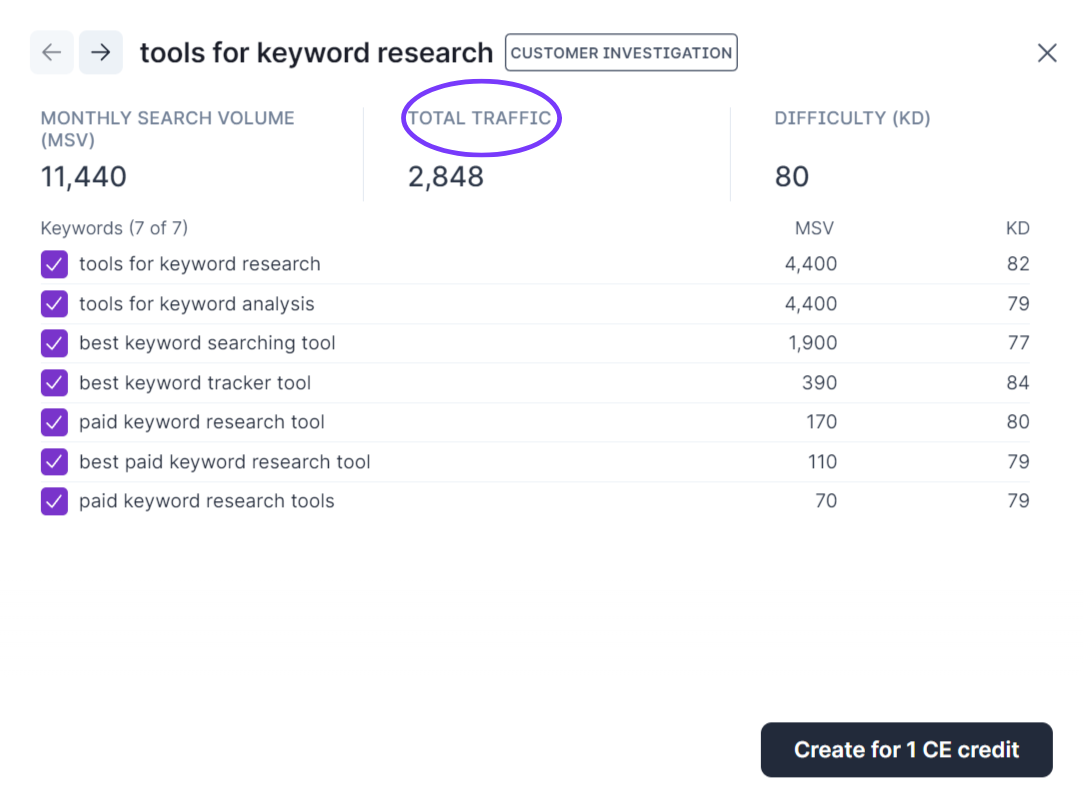
Surfer Keyword Research displays the potential traffic you can expect from a keyword cluster, in addition to keyword difficulty and search volume. For example, Surfer predicts 1,115 visits to my web page if I cover "best keyword research tools" based on my website authority in this niche. Use the Total Traffic metric to choose the right keywords for SEO based on expected visitors to your pages.
If you are using Google Trends to research trending keywords, you may find that SEO keyword tools display zero search volume. Do not instantly disregard these search phrases because keyword tools do not immediately reflect live data. Instead, use your judgment and research when it comes to a keyword's popularity.
5. Match search intent to content format
Uncovering the motivation behind a search query helps you create content that satisfies what users actually want. The search intent behind keywords falls under 4 types.
- Informational - the user wants to learn something ("how to," "what is")
- Navigational - the user wants to reach a specific page or brand
- Commercial - the user is comparing options before buying ("best," "vs," "review")
- Transactional - the user is ready to take action ("buy," "sign up," "download")
Identifying search intent is crucial to your SEO strategy because it tells you which type of content to create for your chosen topic. For instance, if you search for the keyword "gaming desk," most search results are e-commerce category pages.
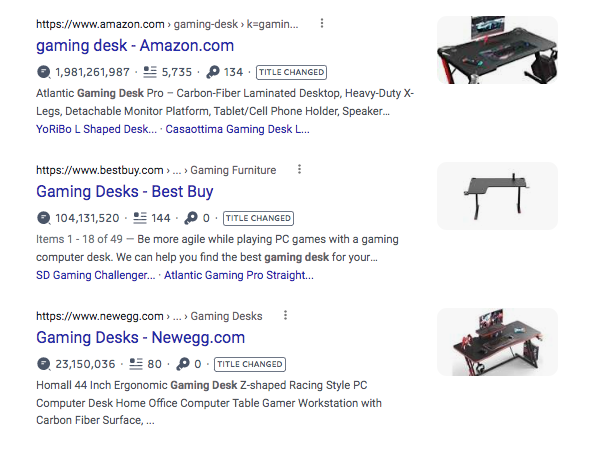
Publishing a review listicle for this keyword is not a good idea when the search rankings serve commercial pages, thereby signaling purchase intent from readers. It is wise for you to tap into successful existing content before you begin writing a new article.
The SERPs are generous with search intent, displaying the most successful pages on top. Identifying search intent can also help you uncover the blog post type that Google prefers so you can increase the chances of ranking well for that keyword.
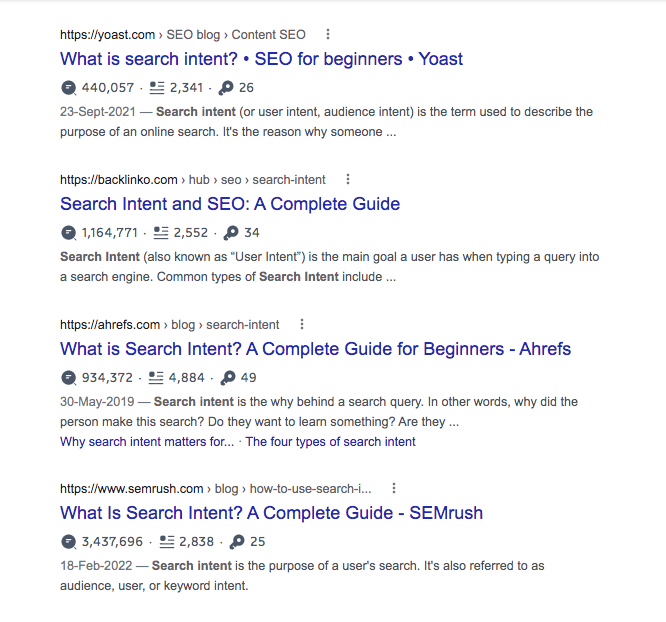
For example, we could have written a listicle of tips to identify search intent for the keyword "search intent," but browsing through the first page rankings confirmed that Google prefers guides instead. We published an actionable guide on search intent in search engine optimization that you should read for a better understanding.
The Keyword Research tool uses your seed keywords to interpret SERP rankings and label keyword search intent, making it easier to choose the right keywords.
For example, Surfer Keyword Research has identified "best keyword research tools" as a customer investigation cluster, defined as a "cluster dominated by comparison of different products and/or services, listings, catalogs and directories relevant to the cluster." This makes sense as most of the top-ranking results are comparisons and reviews of different keyword research tools.
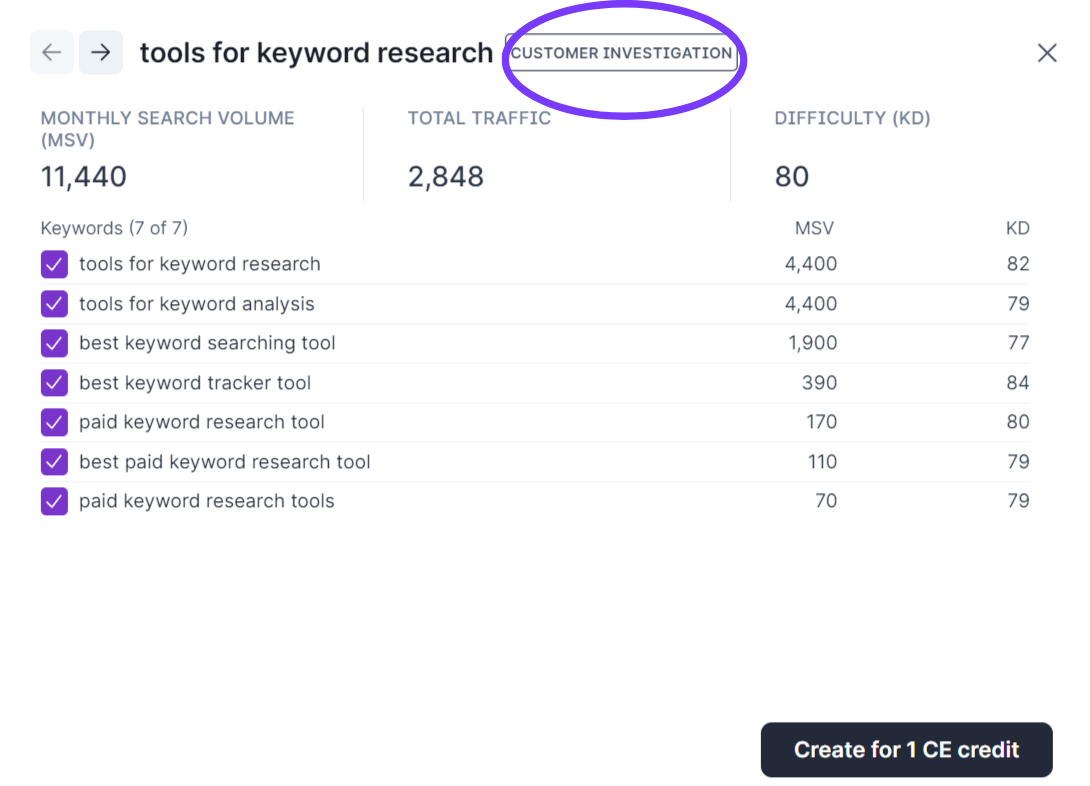
This means that users looking for this search term are still deciding and interested in comparing different products. Aligning content with search intent is crucial in choosing the right keywords.
6. Group keywords into topic clusters
Once you have evaluated individual keywords, the next step is to group related ones into topic clusters. A topic cluster is a set of semantically related keywords that you can target with a single piece of content or across a tightly linked group of pages.
Clustering matters because Google evaluates topical authority, not just individual page relevance. Surfer's Topical Authority Study, which analyzed approximately 253,800 search results, found that page-level topical authority ranked as one of the strongest signals associated with high search positions. Sites that demonstrate expertise across topic clusters consistently outperform standalone pages targeting isolated keywords.
Surfer's Keyword Research tool automatically groups keywords into clusters based on SERP overlap and semantic similarity. Instead of writing a separate article for every minor keyword variation, you can identify which terms belong together and cover them in one comprehensive piece.
For example, "keyword research tools," "best tools for keyword research," and "free keyword research tools" likely share enough SERP overlap to be covered in a single article. Targeting all three separately would risk keyword cannibalization, where your own pages compete against each other.
Surfer's Content Coverage Study of their top 100 performing articles confirmed that comprehensive content covering primary and related subtopics gains visibility for related terms and long-tail queries, boosting overall impressions.
7. Map keywords to pages
The final step is assigning each keyword cluster to a specific page on your site. This prevents cannibalization and ensures every piece of content has a clear purpose.
Follow these guidelines when mapping keywords:
- Assign one primary keyword cluster per page
- Check if you already have a page targeting that topic before creating a new one
- If two existing pages target the same cluster, decide which one to keep and redirect or merge the other
- Map commercial and transactional keywords to product or landing pages, not blog posts
- Map informational keywords to blog posts and guides
A simple spreadsheet with columns for keyword cluster, assigned URL, search intent, priority score, and status works well for tracking. Update it as you publish new content and review it quarterly to catch overlap or gaps.
How to use your chosen SEO keywords
Since search engines rank web pages for multiple keywords, choosing a head keyword is only the beginning of your content creation process. Your blog post must include several semantically related keywords in its body and header tags to help search engines recognize search intent and keyword context.
Head to Surfer's Content Editor to choose secondary body keywords and variations related to the primary keyword in your blog post.
- Enter your main keywords
- Select your country and device preferences
- Click Create Content Editor
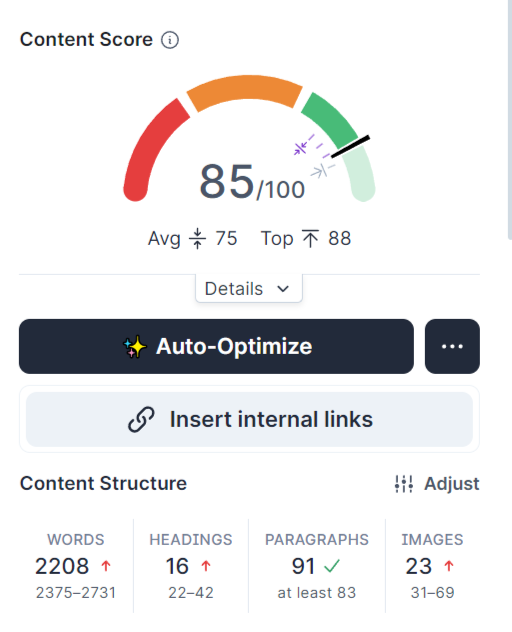
For example, I wrote this article in the editor and inserted the most appropriate keyword suggestions to reach a Content Score of 85 without having to check the SERPs and competitor pages for related keywords. The editor also helped me write naturally and avoid the pitfalls of keyword stuffing.
Surfer's Content Score Study, which analyzed 10,000 queries and 1,000,000 SERP entries, found that Content Score correlates with rankings at approximately 0.28. That is notably higher than the typical correlation measured for backlinks at approximately 0.17, making on-page content quality one of the most controllable ranking signals available to you.
Start choosing keywords that drive real results
Choosing keywords for SEO is not about chasing the highest search volume or the lowest difficulty score in isolation. It requires weighing business value, competitive difficulty, search intent, traffic potential, and topical fit together. The 7-step framework in this guide gives you a repeatable process: build your seed list, filter by business value, check difficulty, evaluate volume and traffic potential, match intent, cluster related terms, and map them to pages.
Your keyword strategy is essential to building a blog that brings in the right visitors, not just more visitors. Start with the keywords your target audience will benefit from most and that connect naturally to your business. Then use tools like Surfer Keyword Research and Content Editor to execute that strategy with data behind every decision.