AI is reshaping how we produce content. Writing assistants built on large language models can turn a brief into a solid first draft in minutes, and that speed is hard to ignore if you ship a lot of pages or campaigns.
Those tools are not stand-ins for human writers. I treat them as collaborators: they expand options, tighten structure, and keep me moving when the blank page wins.
The hard part is making the output feel lived-in. Models default to smooth averages, so the text can read correct yet hollow.
At Surfer, we care about practical edits that add judgment, specifics, and proof so readers trust what they read and the work still lines up with Google's E-E-A-T expectations for experience, expertise, authority, and trust.
What is AI-Generated Content?
AI-generated content is text, images, video, or other media produced by artificial intelligence systems that use natural language processing and machine learning to predict and assemble outputs from training data and prompts.
Adoption is no longer niche. HubSpot's 2025 State of Marketing report finds 47% of marketers already use AI to create content at scale, and bylines increasingly list tools as co-authors or contributors rather than hiding the stack.
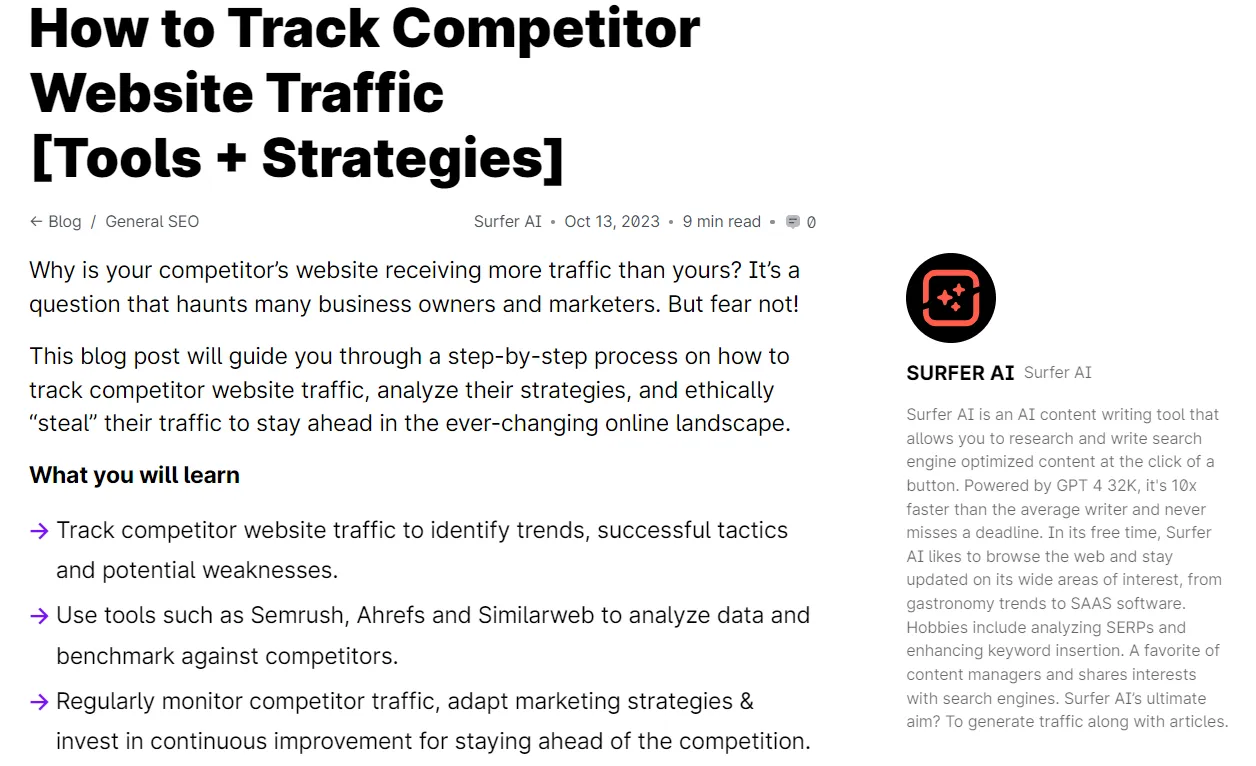
The upside is real for teams under pressure: AI writing tools cut busywork, surface angles fast, rough in sections when deadlines stack, and nudge you past creative blocks without pretending to replace your editorial call on what is accurate, fair, and worth publishing.
Why should you humanize AI content?
You humanize AI drafts so the finished article keeps quality, accuracy, and relevance for your audience. Tightening claims, adding specific proof, and trimming generic phrasing lowers the chance that search systems or automated checks treat the page as thin scaled content instead of something worth citing.
Humanizing AI content isn't optional if you want to rank, engage readers, and protect your brand. Here's why.
Bypass AI detection
Humanizing AI content helps you avoid detection by search engines and AI content detection tools.
Google won't penalize you simply for using AI. But in March 2024, it introduced "scaled content abuse" as a specific spam category, targeting sites that publish content at scale without ensuring quality and value—exactly what humanization prevents.
Readers notice too. An Attest 2025 survey found that 59% of consumers worry about brands losing "the human touch," and Bynder's data shows 52% feel less engaged when they suspect AI content.
By bypassing AI detectors, you ensure your text doesn't sound robotic—and that it provides real value to both readers and search engines.
If you need to accompany your content with an AI originality report, learning how to humanize AI content is essential.
The Information Gain imperative
There's a powerful SEO reason to humanize AI content that most people overlook: Information Gain.
In 2022, Google was granted a patent for an Information Gain scoring system that measures how much new, unique information a page adds beyond what already exists in the search results. Pages that simply restate what's already ranking get a lower score. Pages that contribute original insights, data, or perspectives get rewarded.
This is where unedited AI content hits a ceiling. Large language models generate text by predicting the most statistically likely next word based on their training data. By definition, they synthesize what already exists—they can't produce genuinely novel insights, personal experiences, or original research.
When you humanize AI content by layering in your own expertise, proprietary data, unique examples, and first-hand experience, you're directly increasing its Information Gain score. You're giving Google a reason to rank your page above the dozens of other AI-generated articles covering the same topic.
Information Gain is the SEO framework that explains why humanization isn't just about sounding human—it's about adding value that AI alone cannot provide.
Think of it this way: if your content could have been written by anyone with access to ChatGPT, Google has no incentive to surface it. The moment you add something only you can contribute—an original case study, a contrarian opinion backed by data, a lesson from personal failure—you've created Information Gain that no AI can replicate.
Add a human touch
AI-generated content often lacks the human touch, resulting in a narrative that can come across as bland and lacking in personality.
The data backs this up. FirstPage research found that human-written articles receive 5.44x more organic traffic than their AI-generated counterparts. And as mentioned, Bynder's 2024 study shows 52% of readers feel less engaged when they suspect content is AI-written.
Here's a short blog post introduction I asked ChatGPT to write:
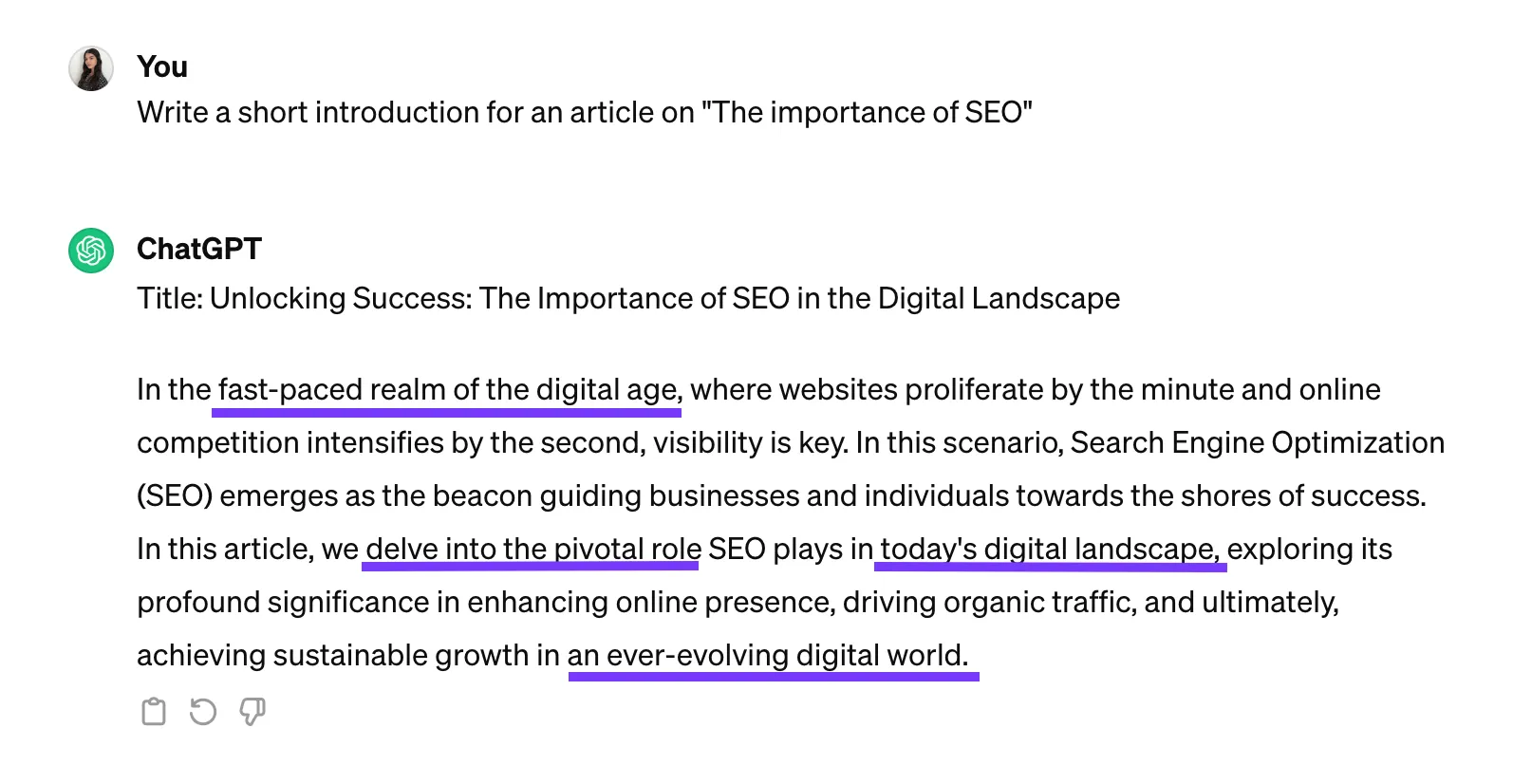
As you can see, it starts with the dreaded "in the fast-paced realm of the digital age" and includes many overused AI terms like "delve into", "today's digital landscape", and "in an ever-evolving digital world".
I bet you've read similar intros dozens of times. It feels dragged out, lacks originality, and causes readers to lose interest.
Although Google has nothing against AI-written text, it will penalize sites that use AI content to hack search engine algorithms or provide little to no value to readers.
AI algorithms are fundamentally limited to the data they have been trained on, which means they can't provide truly novel ideas or innovative thoughts that haven't been previously expressed.
Artificial intelligence lacks the ability to draw from personal experiences or make intuitive leaps that are often the hallmark of human creativity.
By adding a human touch to AI-generated text, you maintain authenticity and provide value to your readers, which aligns with Google's emphasis on valuable content.
As Google states:
"However content is produced, those seeking success in Google Search should be looking to produce original, high-quality, people-first content demonstrating qualities E-E-A-T."
Improve user engagement
Humanizing AI text is crucial for enhancing user engagement because it bridges the gap between automated content and genuine human interaction.
The numbers are compelling. FirstPage's research shows human-written content holds readers' attention 41% longer than AI-generated text. Wellows reports that humanized content achieves 2x higher click-through rates and 30% more social shares compared to raw AI output.
When content feels more personal and relatable, readers connect with it on an emotional level. This connection fosters trust and credibility, making readers more inclined to stay on the page, absorb the information, and share it with others.
Humanized content is more likely to hold readers' attention, reducing bounce rates and increasing the time spent on the site.
By incorporating personal anecdotes, relatable language, and a conversational tone, AI-generated content transforms from bland and robotic to engaging and memorable—ultimately leading to higher user satisfaction and loyalty.
Maintain your brand image
Humanizing AI content also helps you maintain your brand image. AI writing, if left unrefined, can come across as generic, impersonal, and devoid of the unique voice that defines your brand.
By infusing AI content with a human touch, you ensure that it aligns with your brand's tone, values, and personality.
Consistency in brand voice is crucial for building trust and recognition among your audience. When your content consistently reflects your brand's unique style, it reinforces your brand identity and makes it more memorable.
Moreover, AI-generated text can sometimes lack awareness of cultural nuances and context, potentially leading to misunderstandings or even offending certain audiences.
By humanizing AI content, you can ensure that it respects and acknowledges diverse cultural backgrounds, traditions, and values.
Emphasizing cultural sensitivity in your content creation process ensures that your message is well-received by people from different cultural contexts, thus enhancing your brand's reputation and reach.
When to humanize heavily — and when to skip it
Not all content needs the same level of humanization. Spending hours refining an internal knowledge base article is a poor use of time. But publishing a raw AI draft as a thought leadership piece could damage your brand and rankings.
Here's a practical framework for deciding how much humanization each content type needs:
Humanize heavily:
- Thought leadership and opinion pieces — These live or die on originality. Readers expect a unique perspective, and Google's Information Gain scoring rewards it.
- YMYL content (health, finance, legal) — Accuracy is non-negotiable. AI hallucinations in these areas can cause real harm, and Google applies extra scrutiny to E-E-A-T signals.
- Sales and landing pages — Conversion copy needs brand voice, emotional resonance, and persuasion that AI struggles to deliver consistently.
- Content targeting competitive keywords — When dozens of sites cover the same topic, only content with genuine Information Gain will break through.
Light editing is usually enough:
- Internal documentation — Accuracy matters, but voice and originality are less critical.
- Product specifications and data sheets — Factual accuracy checks are essential, but the content is inherently structured and formulaic.
- Data summaries and reports — The data itself provides the value; the wrapper text just needs to be clear and correct.
- Email templates and transactional content — Quick clarity is the goal, not literary flair.
Before applying the 13 tips below, ask yourself: where does this piece fall on the spectrum? The answer determines how much time and effort to invest in humanization.
13 tips to humanize AI content
Here are 13 practical tips to make AI-generated content sound more human and avoid AI detection. Use the framework above to decide which tips to prioritize for each piece—some articles need all 13, while others only need a handful.
1. Humanize AI prompts
If you want to get better results from AI content generation tools, you need to give them better instructions. The quality of the output is largely dependent on the quality of the input—and this matters more than ever now that tools like GPT-4o, Claude, and Gemini each respond differently to the same prompt.
Be specific with your prompts and provide the AI with detailed custom knowledge by asking it to:
- Adopt a persona
- Use a specific tone of voice
- Include specific facts and examples
- Exclude certain terms and phrases
- Stay within a set word count
Let's head back to the introduction above and see how a few tweaks in my prompt changed the output.

Finding the perfect prompt might require some tries, which can be time-consuming.
That's why Surfer AI has standardized the prompting process. Before Surfer AI starts writing an article, you can:
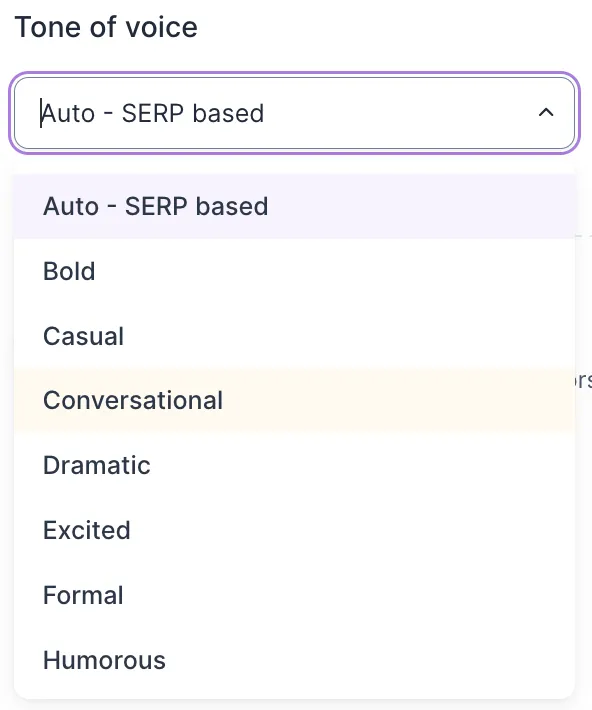
- Set your preferred tone of voice from a list of 13 voices
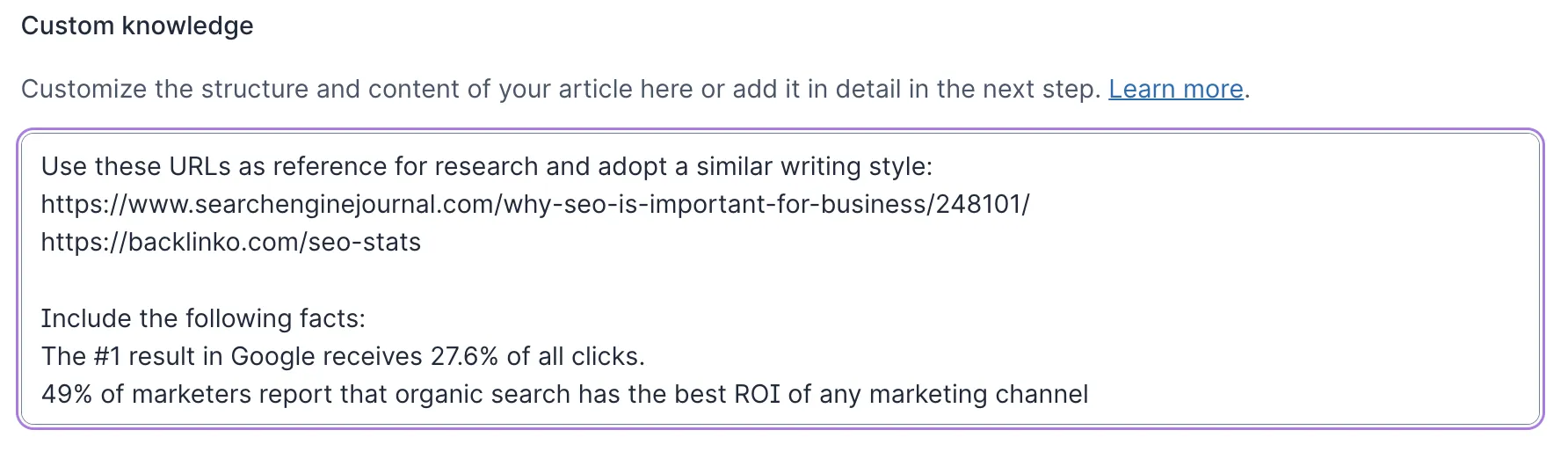
- Add specific sources, knowledge, and URLs through Brand Knowledge—which teaches Surfer your business context and integrates across all tools
- Pick which competitors to base the article on
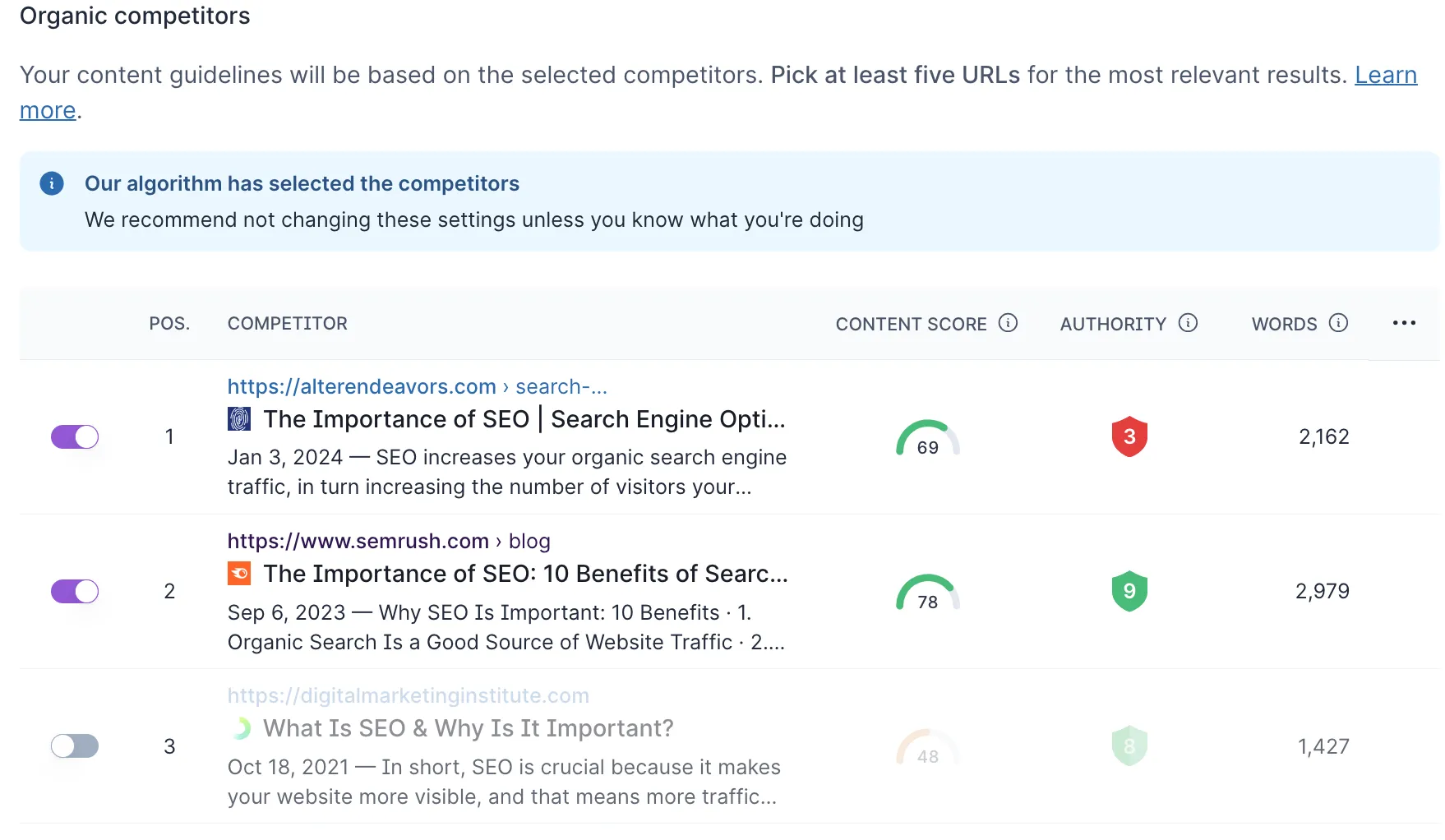
Surfer AI also includes AI Search guidelines that help ensure your content is formatted for AI Overviews and generative search results. Personalized instructions allow AI to produce content that reflects a deeper understanding of specific topics, leading to more nuanced outputs.
2. Share personal insights
People love stories—and Google does too. Weave into your content stories of success, failure, or learning moments that are relevant to the topic.
It's a powerful way to differentiate your content in a sea of AI-generated articles.
Sharing a personal story can be much more impactful than generic advice.
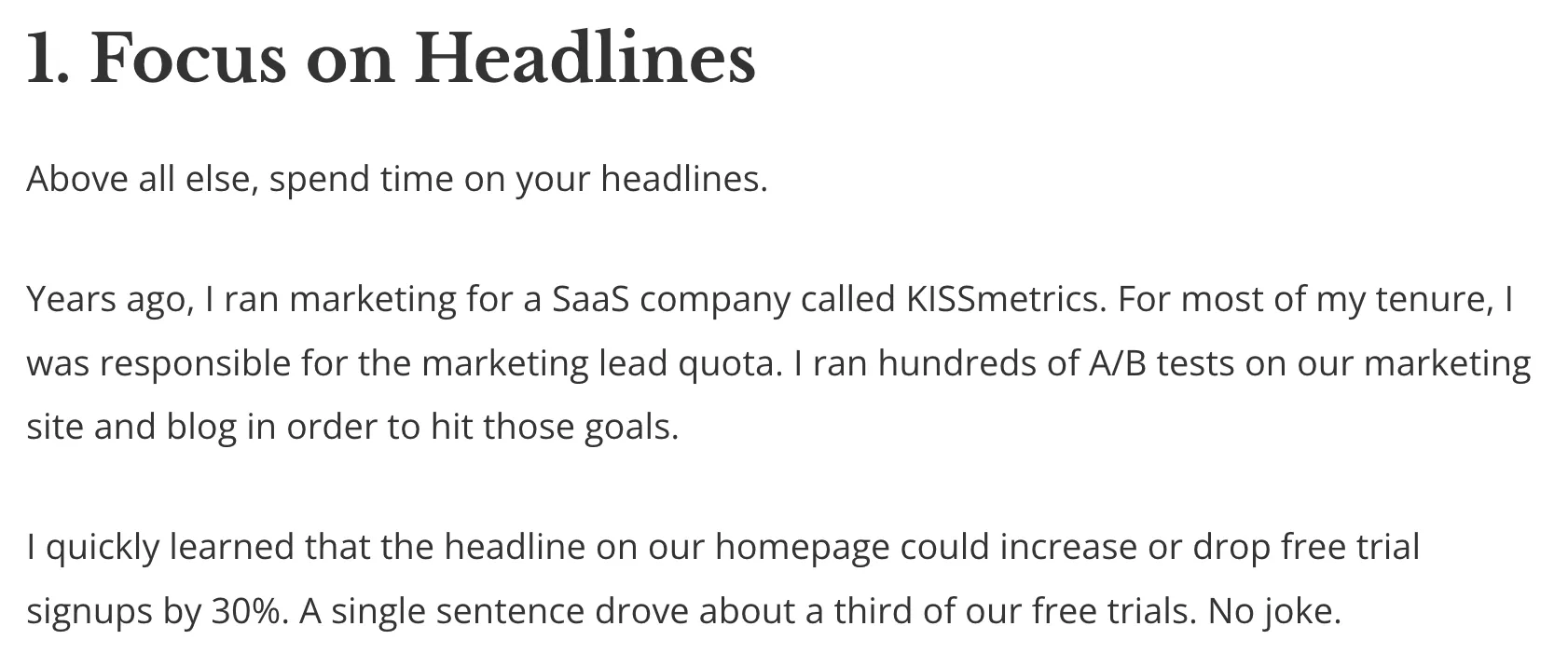
Just look at this example from QuickSprout. Such personal insights demonstrate the author's direct involvement in the field, making the advice all the more credible.
You can also share personal viewpoints on current trends within the industry, including how those trends might evolve and their potential impact.
This is a great way to show expertise in the eyes of search engines. As part of its E-E-A-T guidelines, Google emphasizes the importance of demonstrating expertise in content creation.
3. Use an AI Humanizer Tool
An AI humanizer works by analyzing text for statistical patterns that AI detectors look for—repetitive phrasing, predictable word choices, uniform sentence length, and low perplexity scores—then systematically disrupts those patterns while preserving meaning.
The best humanizer tools use a combination of three techniques:
- Pattern elimination — Identifying and replacing the specific phrases and structures that flag AI detection
- Statistical disruption — Varying sentence length, vocabulary, and complexity to increase burstiness scores
- Semantic enrichment — Replacing generic language with more specific, natural-sounding alternatives
Surfer's free AI Humanizer tool can transform AI-generated content into text that feels more human.
You can use any AI writer, including ChatGPT, Claude, or Gemini, to create content and then humanize it. It's a straightforward process:
- Visit Surfer's AI content humanizer tool.
- Enter your content.
Surfer's Humanizer will analyze your text to determine if it was generated by an AI tool and provide a probability score.
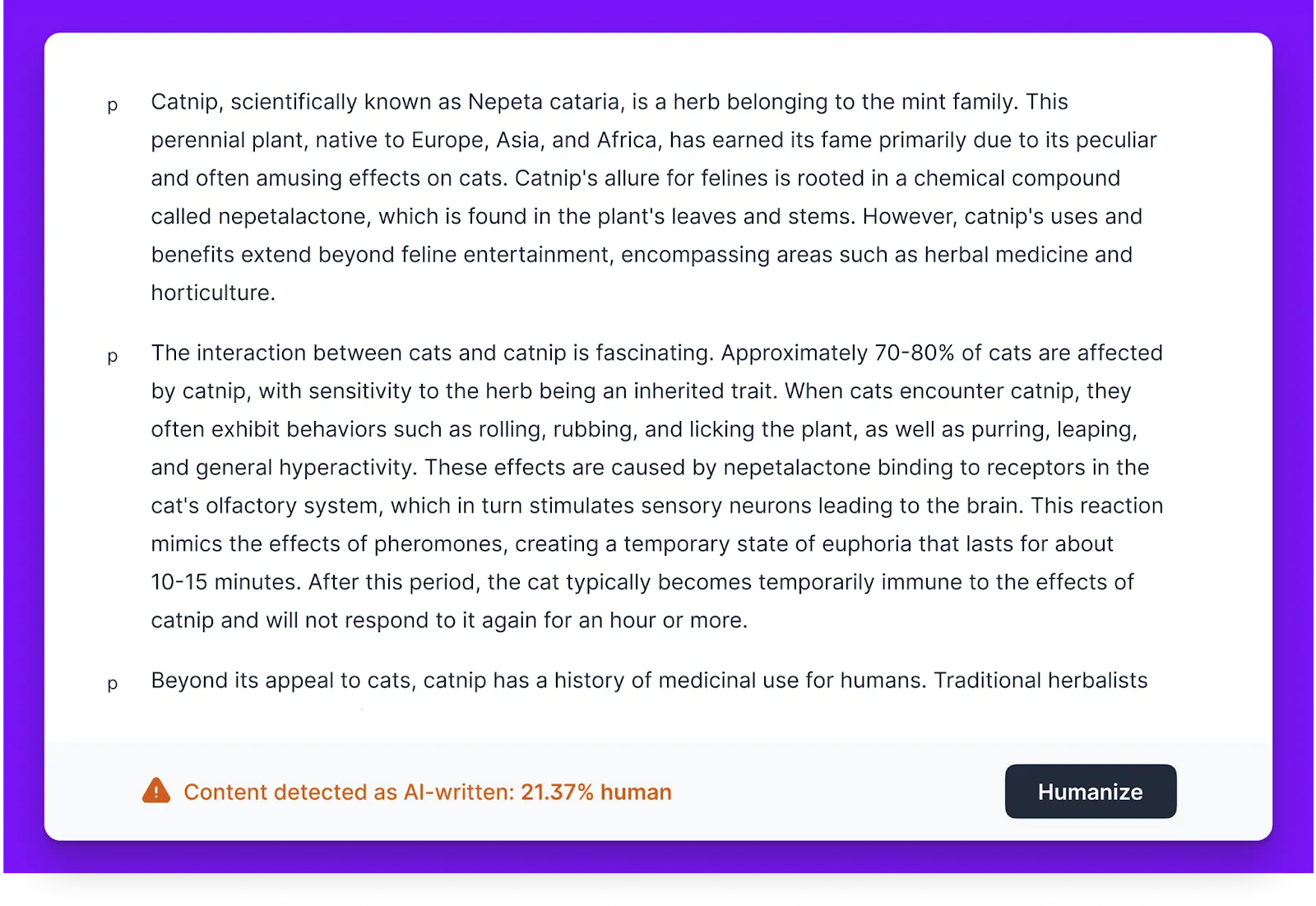
For example, a 93% human score means there's a 93% chance the content was written by a human, while a 7% human score indicates only a 7% chance of human authorship.
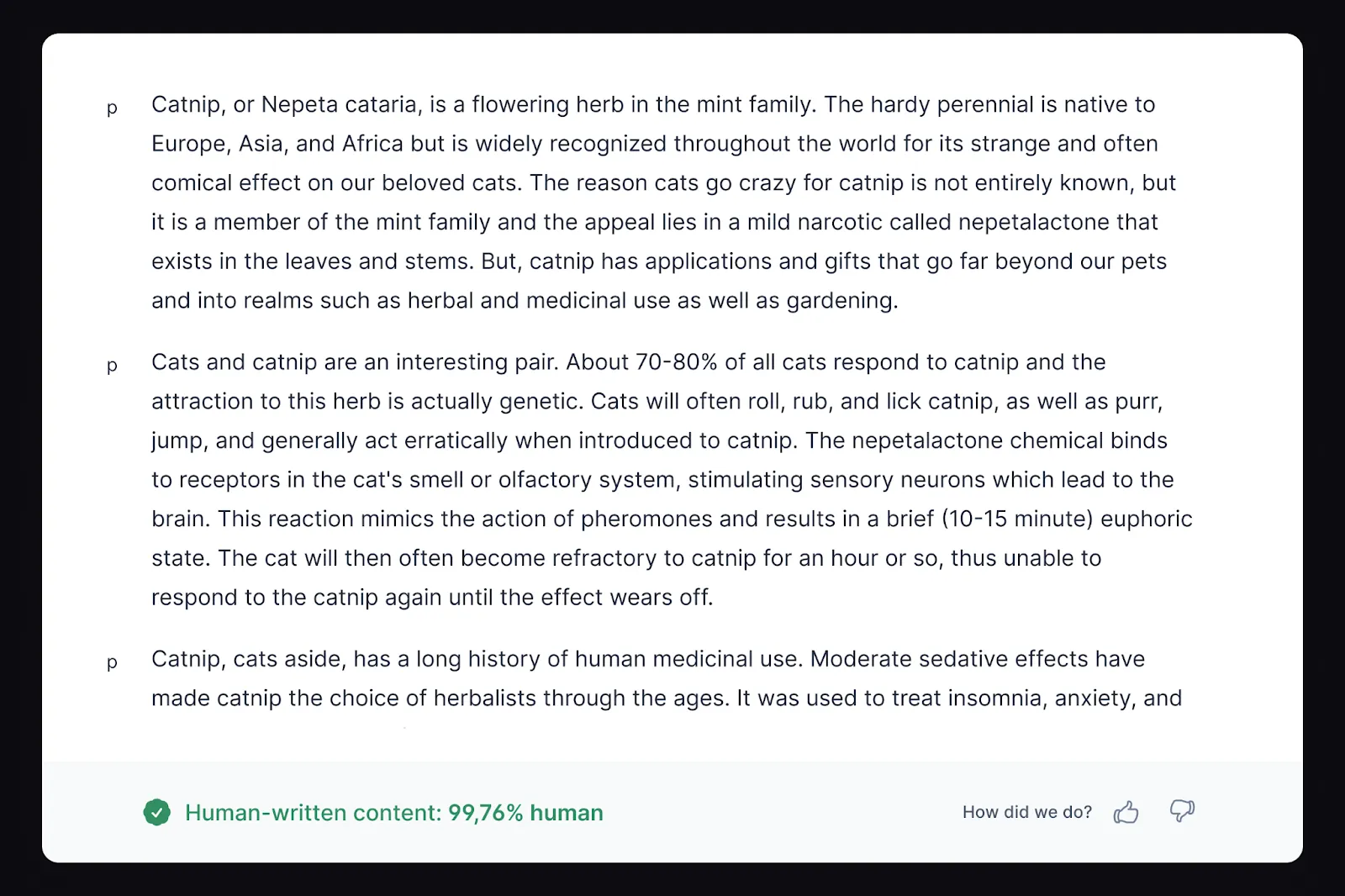
Rewriting with Surfer's Humanizer can help you humanize AI content and avoid AI detectors.
As you can see, the Surfer humanized content now has a human-written score of 99.76%.
However, ensure your content is valuable to readers and not just a result of mass AI content generation.
For teams processing content at scale, the Surfer Humanizer API enables bulk humanization and CMS integration—so you can humanize hundreds of articles without manual copy-pasting.
Using an AI humanizer can save time during the editing process and ensure your content maintains the engaging, relatable quality that readers expect from human authors.

4. Communicate authority
Another way to humanize AI text is by incorporating relevant statistics or case studies to reinforce your statements.
Let's look at an example from Optinmonster. The post links to real-life examples to demonstrate how effective guest posting is and help readers better understand the strategy's benefits.
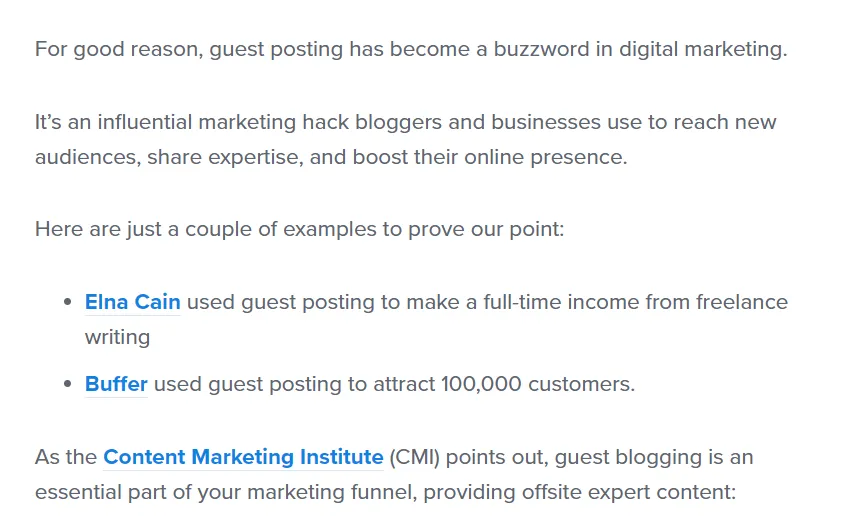
Rather than simply saying, "Guest posting is an effective marketing strategy," the phrase "Buffer used guest posting to attract 100,000 customers" and linking to the case study adds a lot more weight and credibility.
Search for your keyword in Google followed by "statistics" or "case studies":
- [keyword] statistics
- [keyword] case studies
Alternatively, when creating content with Surfer AI, you can use Brand Knowledge to feed in statistics and examples. The AI will weave those references into the article for you.
Look at how Surfer AI has used the Custom Knowledge I inputted in the first step into the final article.

Just don't forget to always cite your sources.
5. Include real-life examples
Integrating photos, self-made charts, infographics, and videos enriches your content and provides compelling evidence to support your narrative.
These visual elements can transform abstract concepts into concrete examples, making the message more digestible and memorable.
For instance, Brand24 uses real-life examples to illustrate the importance of advertising in appealing to the audience's emotions.
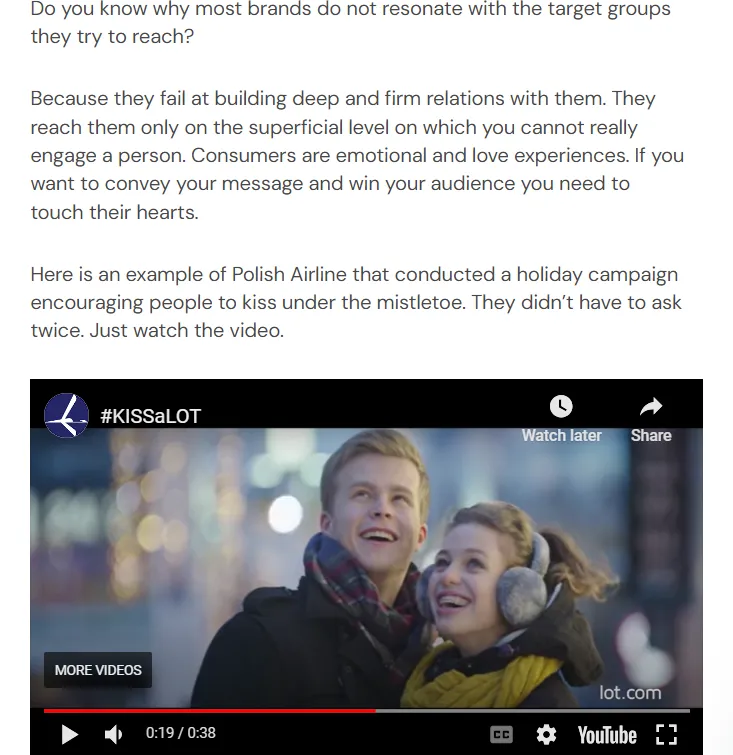
Besides, no one likes to read through huge blocks of text—visual elements help break up monotony and create a more engaging reading experience.
Moreover, examples prove the author's direct engagement and practical knowledge of the subject matter, effectively showcasing the 'Experience' aspect of Google's E-E-A-T guidelines.
Just look at this post from Landingi, which teaches users how to set up their Google Analytics 4 (GA4) accounts so they can track micro-conversions.
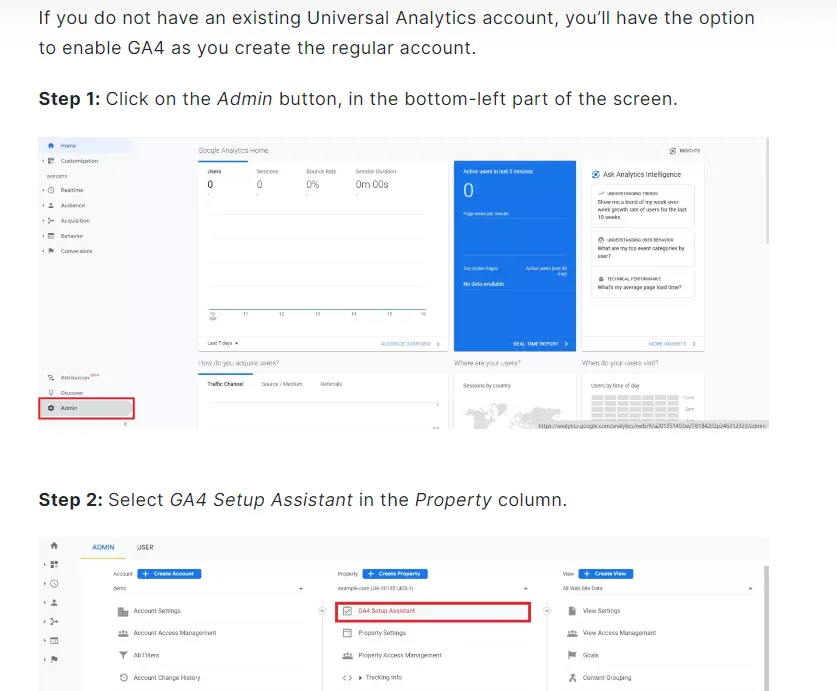
In contrast to a text-only step-by-step format, the visuals give users practical extra guidance on what they need to do and how to do it—showing that the author has first-hand experience in the topic.
6. Use first-person pronouns
Since 2023, Google has emphasized 'Experience' as part of its E-E-A-T guidelines, highlighting the value of content created from direct, personal encounters or hands-on knowledge in a particular field.
Alongside personal insights and examples, using first-person pronouns can help you convey direct experience with the subject.
Zippy's case study found that content containing first-person pronouns like "I," "my," "we," and "ours," often ranks higher in search results.
Here's how Pack Hacker uses first-person pronouns alongside images to show their reviews are based on real experience.

This can also act as social proof for readers—first-person pronouns remind them that expert human writers are behind the content.
7. Rewrite overused AI terms
As I mentioned earlier, AI content generation tools tend to repeat themselves. There are quite a few words AI tools like ChatGPT love to use—and they're a dead giveaway to both readers and AI detectors.
GPTZero's February 2025 analysis quantified exactly how much more frequently AI uses specific phrases compared to human writers. The numbers are staggering:
- "Provide a valuable insight" — used 468x more by AI
- "Delve" — used over 100x more by AI
- "In today's digital landscape" — used over 200x more by AI
- "Unlock," "unleash," "harness" — consistently flagged as AI markers
Here's the full list of overused AI words and phrases you should watch out for:
- "In today's world," "In the world of," "In today's era"
- "Unlock," "unleash," "unveil," "unravel," "uncover"
- "Critical," "crucial," "essential," "it's important to"
- "Delve," "embark on a journey," "pave the way"
- "In conclusion," "in summary," "ultimately"
- "Furthermore," "moreover," "additionally"
- "Bustling," "vibrant," "hustle and bustle"
As a general rule, look for pompous adjectives that sound like they come from someone trying to show off their vocabulary—there's no need for that.
You can also run your text through an AI detector to identify the most problematic sentences. The detection landscape has matured significantly:
- Surfer's AI Content Detector — free and integrated with the Surfer ecosystem
- Pangram — claims 99.98% accuracy, verified by university research
- Copyleaks — 99%+ accuracy across 30+ languages
- GPTZero — widely used in education and publishing
- Originality.ai — popular among content agencies
Most of these detectors highlight specific sentences that are likely AI-generated, giving you a clear roadmap for what to rewrite.
8. Use the active voice
AI text is typically heavy on passive voice, which makes the content more difficult to read. Here's a brief example:
- Passive: "The content was written by him."
- Active: "He wrote the content."
The second sentence is straightforward, fluff-free, and more engaging.
Rewrite content in an active voice to make it sound more natural.
Or you can use an AI tool like Surfy, our AI writing assistant, to do it for you. Simply highlight the text and tell Surfy to rewrite it in active voice.
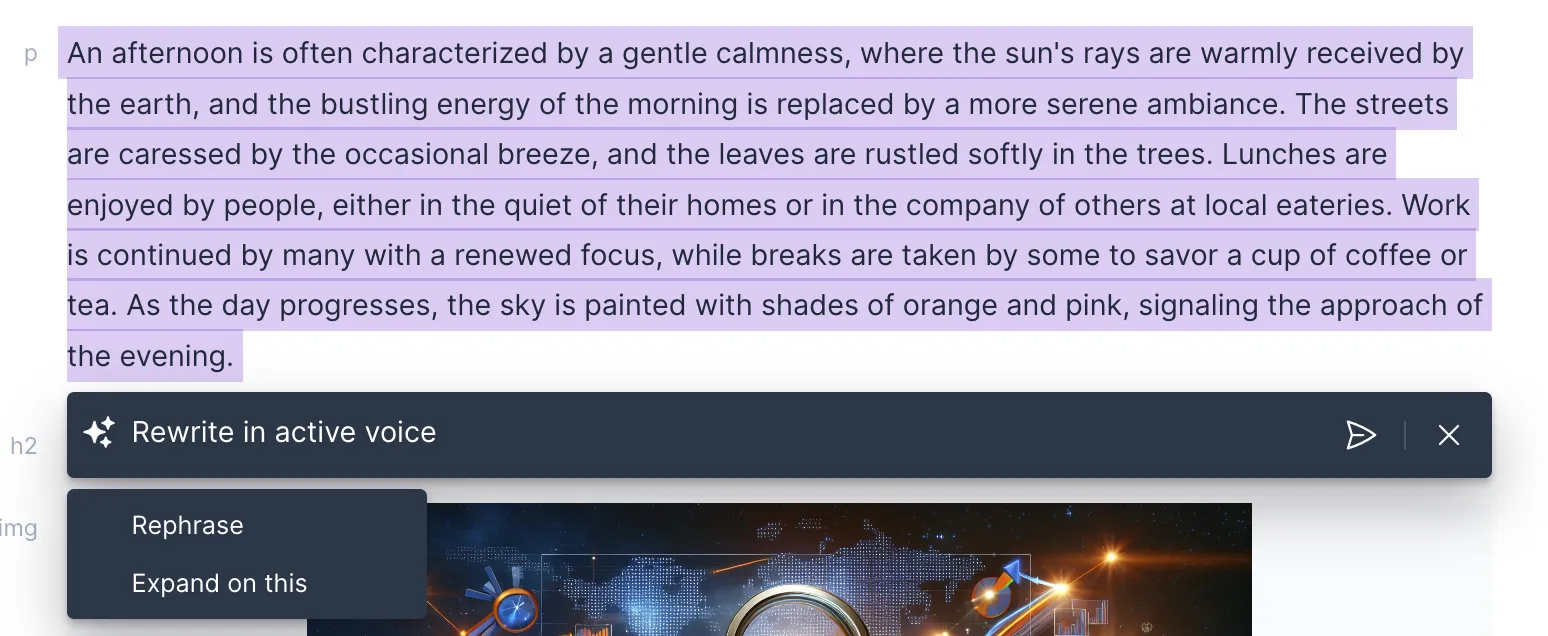
And in seconds, you'll have a natural-sounding, more engaging paragraph.

9. Fact-check AI content
AI content isn't always accurate. Large language models generate text by predicting statistically likely word sequences—they don't understand truth the way humans do, which means they can "hallucinate" convincing but completely fabricated facts.
The online world is filled with stories like this one:
Here's a practical verification workflow to catch these errors:
- Cross-reference primary sources — Never trust an AI-cited statistic without clicking through to the original study or report.
- Check recency — AI models have training cutoffs. Verify that data, laws, or guidelines haven't changed since the model was last updated.
- Verify quotes and attributions — AI frequently invents quotes or attributes real quotes to the wrong people.
- Test links — AI-generated URLs often look plausible but lead to 404 pages.
It's crucial to fact-check AI content against credible sources and provide citations to ensure accuracy. This enhances trustworthiness and adds depth, showing readers you've done your due diligence.
10. Edit like a real person
If there's one thing I've emphasized throughout this post, it's that you should treat AI content like a first draft rather than a finished article.
Don't skip the editing phase.
Edit the content to align with your brand's voice and supplement it with personal insights and examples, ensuring the final output is engaging and authentic rather than generic and automated.
Replace jargon or less common words with simpler, everyday language that readers are more likely to use and understand. This wins your readers' trust and reduces the chances of being flagged by AI detectors.
Let's see a practical example. Here's a short blog introduction I created using ChatGPT:

Here's how I would edit it:
"Fun fact: Google's name is a misspelling of the word 'googol,' a mathematical term for a 1 followed by 100 zeros, which hints at the search engine's endless resources of information. But there are a lot more to the story of Google! Let's have a look at the tech giant's history and see how a small garage project turned into a company that now rules the internet."
The intro is now more direct and conversational, but it still maintains a large portion of the ideas generated by the chatbot.
11. Vary perplexity and burstiness
Perplexity and burstiness aren't just writing style concepts—they're the specific metrics AI detectors use to flag machine-generated text.
Perplexity measures how unpredictable your word choices are. AI tends to pick the most statistically probable next word, resulting in low perplexity. Human writers make unexpected word choices, use slang, and take creative detours—all of which increase perplexity.
Burstiness measures variation in sentence length and structure. AI-generated text tends to produce sentences of similar length and rhythm. Human writing naturally alternates between short, punchy sentences and longer, more complex ones.
AI detectors flag text with consistently low perplexity and low burstiness as likely machine-generated.
To improve both metrics, mix short sentences with long ones. Throw in a question. Use a fragment for emphasis. Then follow it with a detailed, multi-clause sentence that unpacks the idea. This mirrors the natural rhythm of human thought.
You can also use content formatting to boost burstiness: mix short and longer paragraphs, integrate different types of media, use bullet lists, and break up text with subheadings.
12. Leverage original data and research
Original data and research is the highest-value form of Information Gain you can add to AI-generated content. It creates something no other page in the search results can replicate.
Original data provides unique insights and perspectives that cannot be found elsewhere, making your content stand out.
When you incorporate your own research findings, surveys, or case studies, you demonstrate expertise and a deep understanding of the subject matter. This directly boosts both your Information Gain score and your E-E-A-T signals.
For instance, Airbnb often publishes Trends reports leveraging the data it gathers from its users.

You could also present this data through charts, graphs, and infographics, making the content more engaging and visually appealing.
Think about what proprietary data your organization has access to. Customer surveys, internal benchmarks, usage statistics, A/B test results—all of these can be turned into original content that AI can't generate and competitors can't copy.
13. Choose the right AI writing tool
The AI writing tool you choose directly affects how much humanization work you'll need to do afterward. The right tool reduces the gap between raw AI output and publish-ready content.
Here's a framework for evaluating any AI writing tool:
Content needs
Are you looking to produce general text, or SEO-optimized content that ranks and drives traffic? Tools like ChatGPT generate coherent text but lack built-in SEO functionalities.
AI tools like Surfer AI include features specifically designed for SEO—keyword analysis, content structure optimization, and AI Search guidelines—ensuring content not only reads well but performs well in search results.
Also consider your language needs. If you need content beyond English, look for a tool that supports multiple languages.
Customization options
The quality of AI output depends on the quality of input. Choose a tool that lets you control tone, structure, and source material.
Prompt-based tools allow infinite customization, but infinite options without structure can be hit-and-miss. Surfer AI has standardized the customization process:
- Enter the keyword(s) you want to rank for
- Choose the article type: blog post, product roundup, or single product review
- Select your preferred tone of voice
- Choose your organic competitors from preselected SERPs
- Add custom knowledge through Brand Knowledge—insights, facts, examples, or links that teach the AI your business context
Based on these inputs, Surfer AI generates a content outline you can further customize.
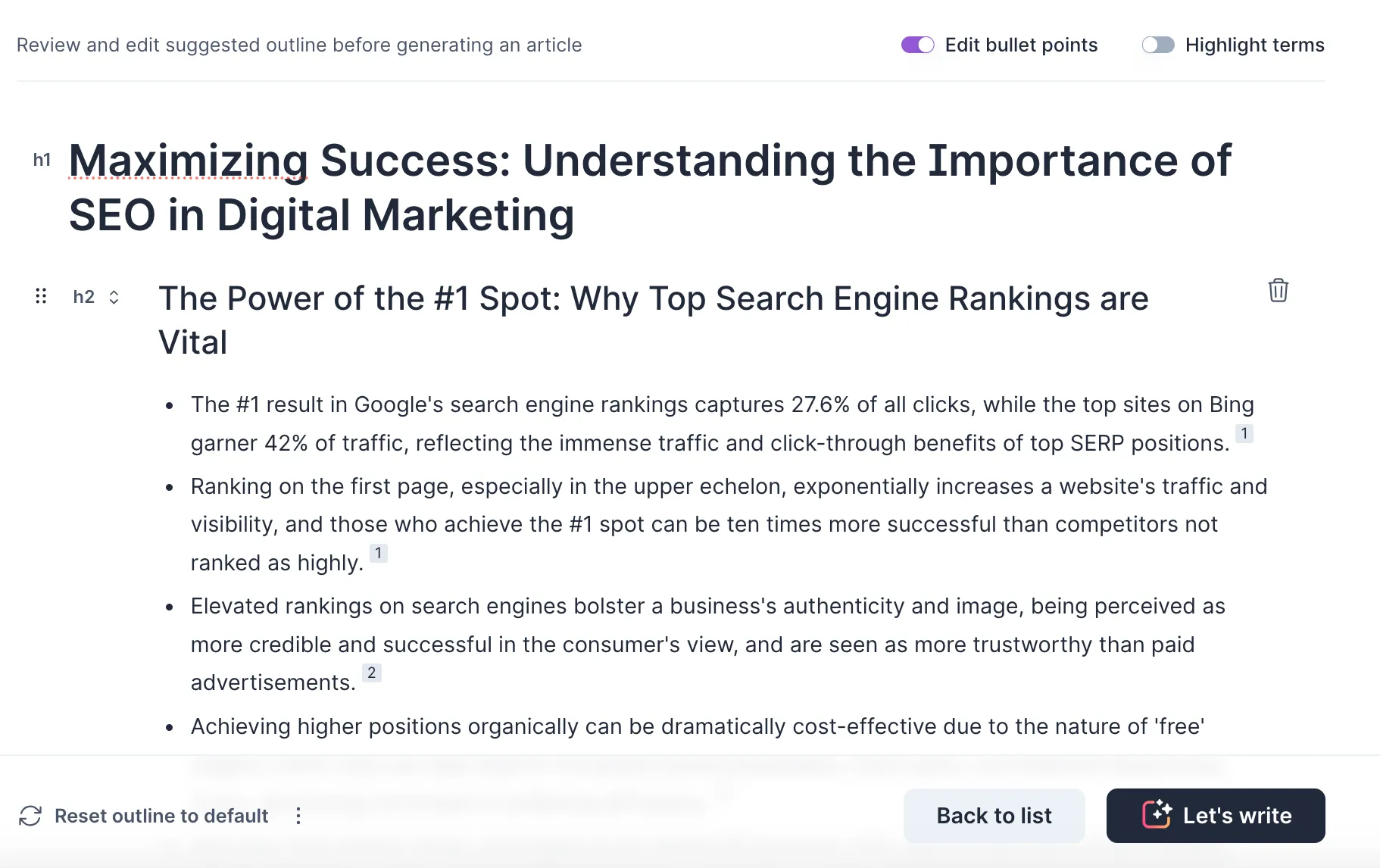
This is where you implement the tips from this article. Add personal anecdotes, statistics, and examples, which the AI will seamlessly integrate into the final article.
Efficiency
The primary objective of AI writing tools is to streamline content creation. Prompt-based tools can be powerful but often require trial and error to achieve the desired output.
With Surfer AI's structured approach, you can create a cohesive first draft in less than 20 minutes—then use the tips in this article to humanize it into something that ranks and resonates.
Humanize AI content for AI Overviews and generative search
AI Overviews are now a dominant feature in Google search results, and they're changing how content gets discovered. Instead of just ranking in the traditional ten blue links, your content can now be cited directly in AI-generated answers at the top of the SERP.
This creates a new optimization layer: Generative Engine Optimization (GEO). And humanized content has a distinct advantage here.
AI Overviews prioritize content that demonstrates three qualities:
- Unique insights — Content that adds something new beyond what other sources cover. This is Information Gain in action.
- Structured clarity — Well-organized content with clear headings, lists, and concise answers that AI can easily parse and cite.
- Authoritative sourcing — Content backed by data, expert perspectives, and credible citations—all hallmarks of humanized content.
Raw AI content that restates common knowledge rarely earns AI Overview citations. But content enriched with personal expertise, original data, and unique perspectives gives AI Overviews something worth surfacing.
Humanization isn't just about traditional rankings anymore—it's about earning visibility in AI-generated search results.
To optimize for AI Overviews:
- Answer specific questions concisely within your content (2-3 sentences that directly address a search query)
- Include original data and statistics that AI systems can cite
- Structure content with clear H2s and H3s that map to user questions
- Add expert perspectives and first-hand experience that differentiate your answers
Surfer's Content Editor now includes AI Search guidelines that scan your content against formatting requirements for AI Overviews. Combined with AI Tracker, which monitors how your content appears in AI-generated answers across ChatGPT, Gemini, and Perplexity, you can measure and improve your GEO performance over time.
How to convert AI-generated text to human writing
Whether you're using ChatGPT, Claude, Gemini, or any other AI writing tool, the process of converting AI text to human writing follows the same Human-in-the-Loop (HITL) editorial workflow.
Here's the five-step process I recommend:
Step 1: Generate your draft with any AI tool. Use the prompting tips from this article—set your tone, provide custom knowledge, and specify what to include and exclude.
Step 2: Run it through Surfer's AI Humanizer. Copy the AI-generated text and paste it into Surfer's free AI Humanizer tool. This eliminates the most obvious AI patterns automatically.

Surfer will analyze the text for common AI writing patterns and change it to make it read as if it were written by a person.

Step 3: Layer in personal insights and original data. This is where humanization really happens. Add your own experiences, unique examples, proprietary data, and expert opinions. This creates the Information Gain that separates your content from every other AI-generated article on the same topic.
Step 4: Verify with an AI detector. Run your revised text through Surfer's AI Content Detector or another detection tool to check your human score. Focus on rewriting any flagged passages.
Step 5: Optimize in Surfer's Content Editor. Ensure your humanized content is also SEO-optimized by checking it against Surfer's content guidelines, including keyword coverage, structure, and AI Search formatting.
For teams processing content at scale, the Surfer Humanizer API lets you automate Steps 2 and 4 across hundreds of articles, with CMS integration for seamless publishing workflows.
How to audit and humanize your existing content library
If you've already published AI-generated content, you're not starting from scratch—but you do need a systematic approach to retroactive humanization.
Here's how to prioritize which articles to humanize first:
- High-traffic pages showing ranking declines — These are your most urgent candidates. If Google's algorithms have begun suppressing them, humanization can recover lost positions.
- YMYL content — Any content touching health, finance, or legal topics faces heightened E-E-A-T scrutiny. Prioritize these for thorough humanization with expert review.
- Pages targeting competitive keywords — Where you're fighting for page-one positions, Information Gain from humanization can be the differentiator.
- Content with high impressions but low CTR — Google may be testing these pages but users aren't clicking, possibly because the content reads as generic in snippets.
Once you've prioritized, here's a batch workflow:
- Run your existing content through Surfer's AI Content Detector to identify the most AI-flagged articles
- Use the Humanizer API to process articles in bulk, eliminating obvious AI patterns
- Assign subject-matter experts to add personal insights, original data, and unique examples to high-priority pieces
- Use Auto-Optimize to refresh articles with updated entities and facts while maintaining your established voice
For a library of 100+ articles, expect this process to take 2-4 weeks with a small team. Start with your top 20 pages by traffic impact, humanize those thoroughly, and monitor ranking changes before scaling to the rest.
Can search engines detect and penalize AI content?
Yes, search engines can detect AI content—and the consequences range from subtle ranking suppression to complete deindexing.
How detection works: Google uses SpamBrain and internal AI detection systems that analyze multiple signals, including low burstiness (uniform sentence patterns), overused AI phrases, low Information Gain (content that adds nothing new to the SERP), and semantic inconsistency (claims that don't hold up logically).
Third-party detection tools have also reached impressive accuracy levels. Pangram claims 99.98% accuracy verified by university research, Copyleaks reports 99%+ accuracy across 30+ languages, and GPTZero is widely adopted in education and publishing.
How penalties work: Google doesn't inherently penalize AI content—it penalizes low-quality content that happens to be AI-generated. There are two distinct mechanisms:
- Manual actions (deindexing) — Google's March 2024 core update deindexed 837 sites, wiping out an estimated 20.7 million monthly visits and approximately $446,000 per month in ad revenue. 100% of these sites showed AI content signals.
- Algorithmic suppression (ranking demotion) — Google's Helpful Content classifier can demote content that doesn't demonstrate sufficient E-E-A-T signals without issuing a formal manual action. Your pages still exist but gradually lose rankings.
Meanwhile, readers are growing more adept at recognizing AI-generated text. Content that lacks a human touch causes visitors to bounce, which further damages your SEO.
The takeaway: Google's guidelines emphasize producing original, people-first content that demonstrates E-E-A-T. Whether your content was written by AI or a human, it needs to provide genuine value. Humanizing AI content is how you ensure it does.
Key takeaways
- Humanize AI content to align with Google's E-E-A-T guidelines, boost engagement, and protect your search rankings.
- Information Gain is the strongest SEO argument for humanization—content that adds unique insights beyond existing SERP results earns higher rankings.
- Google's March 2024 core update deindexed 837 sites with AI content signals. The penalty for low-quality AI content is real and measurable.
- Customize AI prompts with specific instructions, tone of voice, and Brand Knowledge to improve output quality from the start.
- Layer in personal stories, original data, and first-hand experience—these are things AI cannot generate on its own.
- Use a Human-in-the-Loop workflow: generate, humanize, add insights, verify with detection tools, and optimize for SEO.
- Not all content needs the same level of humanization. Prioritize YMYL, thought leadership, and competitive keyword content.
- Humanized content has an edge in AI Overviews and generative search—optimize for GEO to earn AI citations.
- Tools like Surfer's AI Humanizer, Content Editor, and Humanizer API help streamline humanization at scale.
- Treat AI-generated content as a first draft. The editing and humanization phase is where real value is created.
Conclusion
AI writing tools offer a remarkable boost in efficiency, but the real value comes from what you add on top: personal experience, original data, unique perspectives, and genuine expertise.
Use the strategies in this guide to humanize AI content—from personalizing prompts and leveraging Information Gain to optimizing for AI Overviews and running a systematic HITL workflow.
The content that wins in 2026 isn't purely human or purely AI. It's the combination of AI efficiency with human insight that meets Google's E-E-A-T standards and gives readers something they can't find anywhere else.
.avif)